

1
Open the mobile site
Launch Chrome on Android or Safari on iPhone and go to the Crocoslots mobile page.
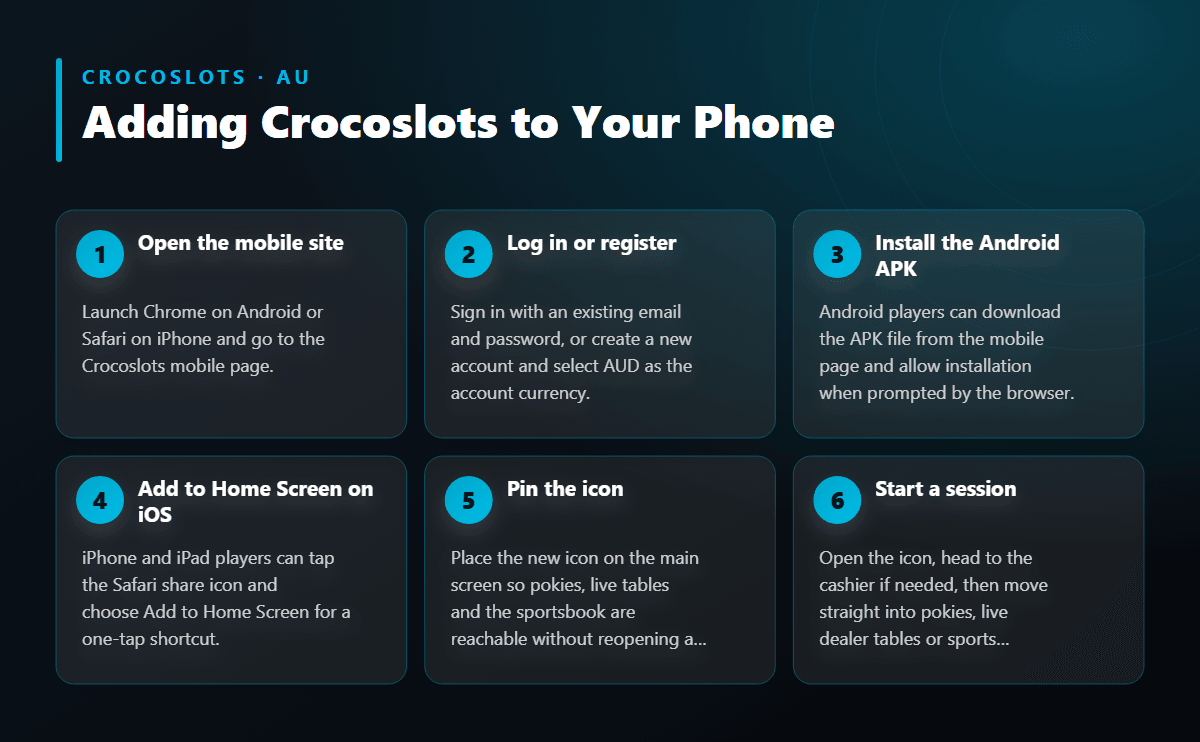
Crocoslots does not offer a dedicated app from Apple's App Store, but Australian players can still get a fast, app-like experience through a progressive web app and an Android APK file. Opening the casino from a phone takes only a browser, and once added to the home screen it launches straight into pokies, live tables and the cashier. This page explains how to set up mobile access on Android and iOS, and what changes once you're playing on a smaller screen.
Crocoslots does not publish a native app through the Apple App Store, but Australian players still get an app-like experience on mobile. The casino runs on a progressive web app (PWA) that works directly inside a phone browser, and an Android APK file is also available for players who prefer a standalone icon on their device. Together these two options cover the games, cashier and sportsbook without needing a desktop computer.
The PWA route suits iPhone and iPad users, since Apple does not allow real-money casino apps on the App Store. Once added to the home screen, the PWA opens in its own window, hides the browser address bar and behaves like a regular installed app. Android players get an extra choice: they can either use the same PWA or install the APK file for a slightly more traditional app feel with its own launcher icon.
| Access Point | How It Works | Setup Needed | Why Choose It |
|---|---|---|---|
| Android phone or tablet | APK file from the casino's mobile page | Download the file and allow install from the browser prompt | A standalone launcher icon with the full lobby |
| iPhone or iPad | Progressive web app via Safari | Add to Home Screen from the share menu | Fast access without an App Store listing |
| Any mobile browser | Mobile-optimised website | No installation needed | Quick play without saving an icon first |
| Desktop or laptop | Full browser version of the site | No installation needed | A larger screen for longer sessions |
| Live casino tables | Streamed through app or browser | Opens directly from the lobby menu | Evolution Gaming roulette, blackjack and baccarat |
| Cashier | Available on every access point | Opens from the main account menu | Deposits and withdrawals in AUD |
Android devices give players two simple paths into the casino. The first is the mobile browser version, which loads the full lobby, cashier and sportsbook without any download. The second is the Android APK, a direct install file offered through the casino's mobile page rather than Google Play, since real-money casino apps are generally kept outside the official Android store.
To use the APK, players download the file from the mobile section of the site, allow installation from an unknown source when the phone prompts for permission, then open the finished install like any other Android app. The APK keeps the same lobby, live tables and banking tools as the browser version, so no features are missed by choosing one method over the other.
iOS devices rely on the PWA rather than an APK, since Apple's App Store rules keep real-money casino apps off that platform. Players open Safari, visit the Crocoslots mobile page and use the share menu to select Add to Home Screen. This creates an icon that sits alongside other apps and opens straight into the casino lobby, skipping the usual browser tabs and address bar.
Chrome on iPhone can also load the mobile site, though Safari gives the smoothest Add to Home Screen result on Apple devices. Either browser keeps the same game library, live dealer tables and cashier menu, so the choice comes down to personal preference rather than missing functionality.
Follow these steps to open Crocoslots on a mobile device and keep it within easy reach for future sessions.
Once installed, the mobile experience mirrors the desktop site closely. Players can browse more than 1,500 games, including pokies, crash titles and traditional table games, straight from a phone screen. Live casino tables from Evolution Gaming, such as roulette, blackjack and baccarat, stream smoothly on mobile data or Wi-Fi, letting players join a live dealer session from almost anywhere.
Popular titles such as Gates of Olympus and Aviator load quickly on mobile, and the layout adapts reel or crash graphics to a smaller screen without losing detail. The sportsbook is also fully reachable from mobile, covering more than thirty sports with pre-match and in-play markets, so punters can switch between pokies and betting slips inside the same session.
The cashier sits one tap away from the lobby, so deposits and withdrawal requests do not require leaving the mobile app. Supported methods include Visa, Mastercard, Neosurf, Bitcoin, bank transfer and POLi, and the AUD currency keeps every amount easy to read on a small screen.
New players can complete registration entirely from a mobile browser or the installed PWA icon. The sign-up form asks for an email address, a password and basic account details, and AUD should be selected as the account currency from the start. For players who already hold an account, the login screen sits at the top of the mobile lobby and accepts the same email and password combination used on desktop.
Players who prefer to set up an account before switching devices can create a Crocoslots account on a larger screen first, then simply log in later through the mobile app or PWA icon with the same details. Password recovery works the same way on mobile as on desktop, and the round-the-clock support team can help if an account becomes temporarily inaccessible.
The cashier inside the mobile app supports the same payment methods as the full site, including card payments, Neosurf vouchers, Bitcoin and bank transfer. A deposit from A$10 keeps the entry point low for players testing the mobile experience, while withdrawals begin at A$50 once an account is verified. Processing for most withdrawal methods takes up to 48 hours, with Bitcoin typically clearing faster than card or bank options.
Players who want a closer look at fees, limits and processing times before choosing a method can check the payment methods page for a full breakdown. Support is available every hour of the day through live chat, so a question about a mobile deposit, a stuck page or a login issue rarely has to wait long for an answer.